Shopify Partner
Open in the small hours.
In May 1984 Jane Snowball, who was 72, ordered her shopping from her local Tesco in Gateshead using an adapted television and its remote control, and she is generally remembered as the first person to shop from home. Shops have stayed open in the small hours ever since. I design and build them on Shopify: themes made for the shop and coded from scratch, apps where Shopify stops short, and the quiet automation behind the counter.
I am a Shopify Partner, and I have built Shopify themes and apps for ten years, as a consultant and as part of other companies' teams. Now I build them for shops of every size, so customers find what they came for and the people running the shop can change it without ringing anyone.
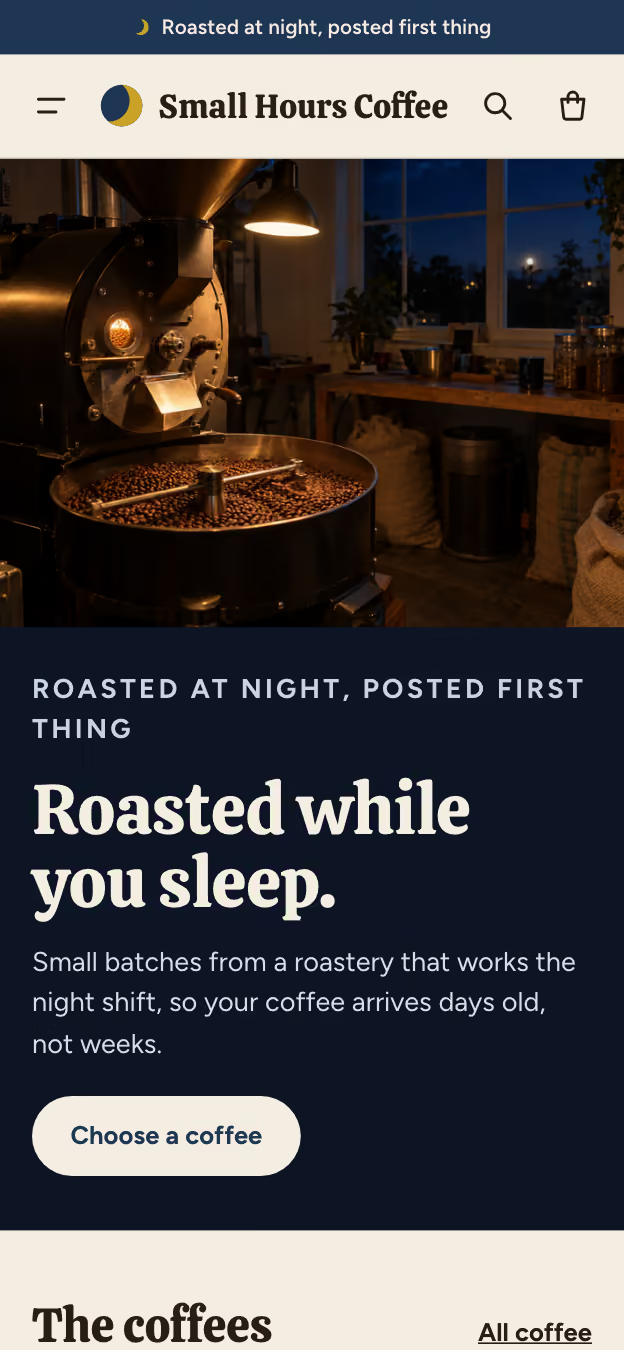
Small Hours Coffee is an example shop, made up for this page. Pick the phone up and buy something: the till rings it up. Nothing is charged and nothing is sent.

The Shopify Partner Program
A Shopify Partner
- A copy firstEverything is built and tried in Shopify's own development stores before it goes anywhere near your shop.
- Your keys stay yoursI come in through a collaborator request you approve, with only the permissions the job needs, and you can take it away at any time.
- Read so you need notShopify announces its changes twice a year, in its Summer and Winter Editions. I read every one, so you do not have to.
At a glance
- For
- Shops of every size, from a first fifty products to thousands
- Covers
- Themes, apps, checkout, moves to Shopify, speed, automation
- Based
- Bath, Somerset
- Kept
- Products, customers and orders in your account, always
Behind the counter
The owner's side
And your side of it.
A shop is bought for the front and lived with from the back. Everything in a theme I build can be changed in Shopify's theme editor by whoever runs the shop: move a section, change the words, swap a picture, try a new colour for Christmas. Have a go.
Theme editor
Home page
Opening picture
Theme settings
A simplified picture of Shopify's theme editor. It only offers colours that everyone can read. Opening hours, seasons, events and the people who make things are written once, in Shopify, and appear everywhere they are needed.
When an order comes in
Shopify's own automation does most of this, with a little code of mine where it stops short. Nobody has to remember any of it, at three in the morning or at three in the afternoon.
- Paid, £20.95
- Tagged as a gift
- Packing slip printed, with the note
- Label bought, Royal Mail Tracked 48
- Stock checked: House Blend 250g, 11 left
- Customer told it is on its way
The work
What I do in Shopify
Themes, designed and coded from scratch
Drawn for the shop and nobody else's, and coded by hand on Shopify's newest theme architecture, so every section and block can be moved and edited in the theme editor. Quick on a phone, kind to screen readers, and kept up to date.
Apps, where Shopify stops short
A private app for one shop, or a public one for many: a hamper builder, a trade price list, a delivery rule, a link to the system in the warehouse. Built to Shopify's standards, and only when no existing app does the job well.
Checkout, discounts and delivery rules
Shopify's checkout is among the best there is, so I extend it rather than fight it: discounts that follow your rules, delivery options that know what can travel, a message on the thank-you page, a check before an order goes through.
Moving to Shopify
From WooCommerce, Wix, Squarespace, Magento, Etsy or a site that has served you well for years: products, customers and orders brought across, and every old address sent on to its new page, so the shop keeps the place in Google it has earned.
Speed and accessibility
Every theme is held to a speed budget and checked against WCAG 2.2 AA, so it opens quickly on one bar of signal and works for everyone, including people who use a keyboard or a screen reader.
Behind the counter
Fifteen years of automating the busywork: orders tagged and routed, stock kept in step, labels bought, invoices sent to your accounts, and the customer told before they think to ask.
Found in search, and by AI assistants
Products described properly, so Google shows the price, stock and reviews, and so the AI assistants people now shop through can find them and recommend them.
Selling in more ways
Subscriptions, gift vouchers, local delivery and collection, wholesale price lists, other currencies, and the till in the shop itself through Shopify's point of sale, all from one stock list.
The brand around it
A logo, labels, and the emails customers get after they buy, so the shop and everything around it look like one business.
Looked after
Shopify changes twice a year and apps change every week. The care plan keeps the theme current, tries every change on a copy first and watches the shop's speed, so nothing breaks on a busy Saturday.
Built in, rather than paid for monthly.
Many shops pay every month for small apps that each add their own script to every page. A theme made for the shop can do a good deal of that work itself, which is quicker for customers and costs nothing a month.
- Colour swatches
- Size and fit guides
- Product badges
- A free delivery meter
- Gift notes
- Delivery or collection
- A delivery date picker
- The next dispatch countdown
- Recently viewed
- A shop finder
- Recipes and FAQs
- Menus with pictures
For your developerUnder the bonnet
- Themes
- Online Store 2.0: JSON templates, sections and nested theme blocks, with settings written for people rather than developers. Liquid, with no build step unless a job needs one. Theme Check and Lighthouse on every change, kept in Git, and deployed with Shopify CLI to an unpublished theme for preview.
- Content
- Metafields and metaobjects for anything structured (opening hours, seasons, makers, recipes, events), edited in the Shopify admin.
- Apps
- Shopify CLI, the Admin GraphQL API, webhooks, theme app extensions and app blocks, and admin extensions, built to Shopify's app requirements. What other platforms call plugins.
- Checkout
- Checkout UI extensions: on the Thank you and Order status pages on every plan above Starter, and on the information, shipping and payment steps on Plus. Shopify Functions for discounts, delivery and payment rules and cart validation: in a public app on any plan, in a custom app on Plus. Old Shopify Scripts rebuilt as Functions.
- Headless
- The Storefront API, Hydrogen and Oxygen, when a shop genuinely needs them, which for a small shop is rarely.
- Privacy
- Shopify's Customer Privacy API, with a consent banner that asks properly. UK GDPR.
- Accessibility
- WCAG 2.2 AA, axe in the test suite, and every path tried with a keyboard and a screen reader.
- Speed
- A budget for each template, with the largest content drawn within 2.0 seconds at the 75th percentile on phones.
- Connects to
- Xero, QuickBooks, Royal Mail Click & Drop, Klaviyo, Mailchimp, Google Merchant Center, and a warehouse or stock system through its API.
How it goes
A rough budget first
Tell me about the shop and roughly what you hope to spend, by email or the order form. Knowing the budget first means the plan fits it, rather than the other way round.
A plan in plain English
What will be built, what will stay as it is (your products, your apps if they earn their keep, your place in Google), and what it costs, all written down before anything is built.
Built beside the live shop
The new theme is built on an unpublished copy in your own Shopify account, and you try it on your own phone while customers carry on shopping, none the wiser.
Switched on, on a quiet day
When you are happy, it goes live on a quiet morning, and I keep an eye on it from then on.
Yours, and looked after
Yours
Your products, customers and orders stay in your Shopify account, under your name, always. I come in through a collaborator request you approve and can remove at any time. The theme is yours outright once it is paid for, as set out in the terms.
Looked after
Launch day is only the beginning. The care plan keeps the theme current with every change Shopify makes, tries each one on a copy before it reaches the shop, and keeps an eye on its speed, month after month, so it keeps pace with you for years.
Questions
Do I need Shopify Plus?
Almost certainly not. Nearly everything on this page works on the Basic plan. Plus is worth its fee for large shops that need to change the checkout itself or run their own private rules in it, and I will tell you plainly if you have reached that point.
Can I keep my apps?
Usually, yes. Each one is looked at: kept if it earns its place, built into the theme if that is better, or let go if nobody uses it.
Can my team change things without you?
Yes. That is what the theme editor is for, and every theme I build is made to be changed there.
Will we lose our place in Google if we move?
Not if the move is done properly. Every old address is sent on to its new page, and the important ones are checked by hand afterwards.
What does it cost?
It depends on the shop, so I ask for a rough budget first and write the plan to suit it.
Tell me about the shop.
Whatever it sells and whatever it runs on now, a few lines and a rough budget are a very good place to start. The reply comes within one working day, from the person who does the work.